



-HG0pdWJah3W7IevWQRLHCLVgEafHOhfZoodR.png)
IIFL clients can now use Quantiply from the following URL:
https://quantiply.iiflcapital.com
NOTE: Quantiply works only with IIFL's MARKETS API system and NOT IIFL's Symphony XTS system. To use Quantiply you need to migrate your IIFL Client ID from the XTS system to the IIFL MARKETS system, incase you have not already done so. Please refer to the Guide for switching to IIFL MARKETS shared below.
I. How to login to Quantiply with IIFL:
1. Click on the Login / Sign Up button on https://quantiply.iiflcapital.com
2. You will be redirected to the IIFL login page. Enter your IIFL credentials using the Client ID and password. Enter OTP or TOTP on the next step. Click on 'Authorise' to give the Quantiply app permissions.
3. Accept the 'Terms' and the Quantiply dashboard will open.
Note: This login process has to be done on a daily basis for the Algos to run. No separate 'Broker Login' will be required. Please login with your IIFL Client ID on https://quantiply.iiflcapital.com daily, between 8 AM and 9 AM for your algos to run automatically.
II. Important points:
- You will no longer need a mobile number to login and use Quantiply. You will only need the mobile number and email id for the purpose of making payments (purchasing credits). You will directly use your IIFL Client ID/Mobile number or TOTP to login and use Quantiply. All your algos will be linked under your IIFL Client ID only.
- No API setup required.
- No Static IP required.
- Subscribe to one of the Subscription plans with the specific number of algos you would like to run daily and start trading.
- Only NSE based F&O contracts will be available for now. BSE contracts will be available sometime next week.
- For old Quantiply users, all migrated algos will be by default Disabled. Please enable all the algos that you want to run.
- Please configure your Telegram Alerts again. If you were already using Telegram Notifications earlier you can use the same Telegram bot for your IIFL accounts, or create a completely new one. If you are trading with any other broker also, then you will have to create a separate telegram bot for that broker. Please refer to the Telegram Alerts guide for the setup instructions: https://quantiply.tech/documentation/other-features/telegram-notifications
- The Forward Testing feature will be unavailable as SEBI & Exchanges have not allowed the same under the new Retail Algo Trading regulations. Though, we're in discussions with the Exchanges to allow and enable the use of Forward Testing. As soon as it is allowed, we will re-launch the feature.
- The Signals feature will also be unavailable as SEBI & Exchanges have not allowed the same under the new Retail Algo Trading regulations. We're in discussions with the Exchanges to allow and enable the use of Signals feature. As soon as it is allowed, we will re-launch the feature.
Important Links:
IIFL Markets web trading terminal: https://markets.iiflcapital.com
IIFL Markets Android App: https://play.google.com/store/apps/details?id=com.indiainfoline
I. Guide for Switching to IIFL MARKETS from IIFL Symphony XTS:
1. For new IIFL accounts:
For all newly opened accounts, accounts opened recently and accounts in which API Trading is not yet initiated, your Trading Accounts will by default be running on IIFL's IIFL MARKETS API system.
2. For existing Symphony XTS API users:
For users currently using IIFL's XTS API services, follow the following process to migrate from XTS API to IIFL MARKETS API:
Step 1:
Connect with your IIFL Relationship Manager and request him/her to enable Trading Rights for IIFL Markets (ONT) for your IIFL account.
Incase no RM is assigned, send an Email to cs@iifl.com from your IIFL registered Email ID. The contents of the Email will be as follows:
Email Subject: IIFL Markets (ONT) trading rights for <your IIFL account client ID>.
Email body:
Please enable trading rights for IIFL Markets (ONT) for my account <your IIFL account client ID>
Step 2:
You will receive an email from IIFL confirming that IIFL Markets (ONT) will be activated shortly. Later, once the trading rights are enabled, login to IIFL Markets trading app and reset the password, by clicking on the Change / Forgot Password ? option.
IIFL Markets trading terminal/web app link: https://markets.iiflcapital.com
Step 3:
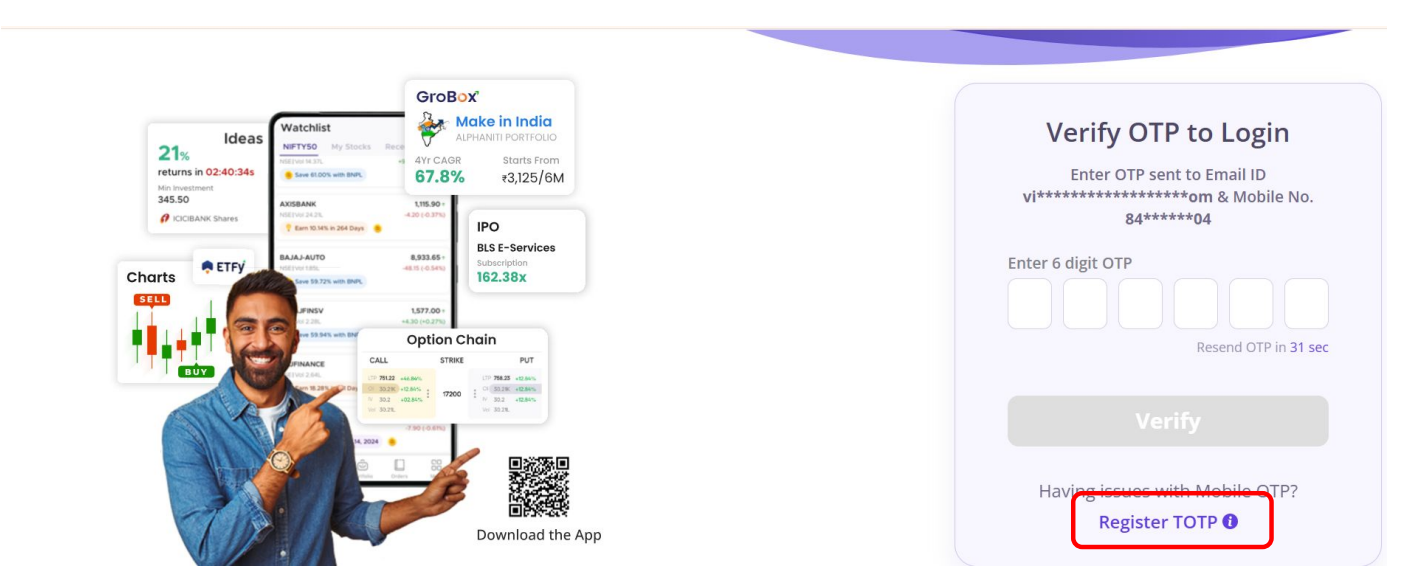
After resetting the password, login with the new password, and on the next page you will be prompted for the OTP. You can setup TOTP by clicking on Register TOTP, if you wish to use TOTP instead of OTP.
For any queries, get in touch with Quantiply Customer Support.