



Disclaimer:
This document is for informational purposes only and describes the mechanics of the strategy as configured on the Quantiply platform. It is not financial advice. Past performance of any strategy does not guarantee future results. Please ensure you understand the risks involved before trading with real capital.
Strategy Overview
This strategy involves selling NIFTY ATM option legs, one Call (CE) and one Put (PE) simultaneously under an intraday setup. What makes this strategy different is that it does not simply stop after a leg exits. Instead, it uses re-entry (Adjustments) mechanisms to get back into the market based on what caused the exit.
Both leg level and strategy level (MTM) re-entry are enabled, meaning the system can restart individual legs as well as the full straddle depending on the situation.
Strategy Snapshot
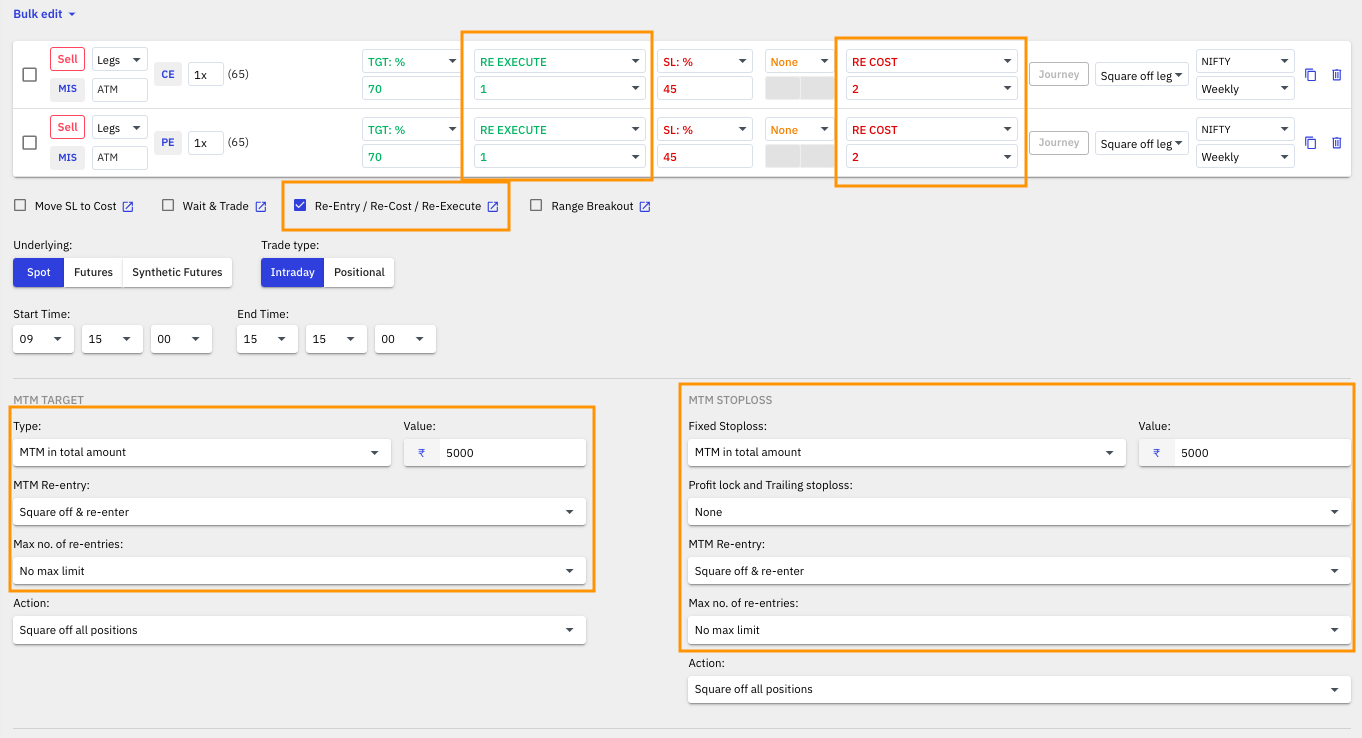 Overview of the key configuration parameters for this strategy
Re-Entry (Adjustments) Configuration:
There are three Adjustments or Re-Entry methods active in this strategy, each tied to a specific exit event:
- Re-Execute: applied when a leg hits its Target
- Re-Cost: applied when a leg hits its Stoploss
- MTM Re-Entry: applied when the overall strategy hits its MTM Target or MTM Stoploss
Each method works differently, and understanding the distinction between them is key to understanding how this strategy behaves during the session.
On Target Hit: Re-Execute
What happens:
When a leg reaches its defined target, the position is squared off, and the system immediately re-executes a fresh position using the original entry logic. There is no waiting. The new leg goes in right away at the current market price.
Why this makes sense:
If a leg hits its target, it means the market moved in a favorable direction. Re-executing immediately allows the strategy to keep participating in that momentum. The assumption is that if conditions were good enough to hit a target once, they may be good enough to do so again.
Example:
The CE leg is sold at Rs. 200 with a target of 50%. The premium falls to Rs. 100, and the target is triggered. The leg is squared off, booking a profit of Rs. 100. The system immediately sells a new CE leg at the current ATM strike, restarting the process.
On Stoploss Hit: Re-Cost
What happens:
When a leg hits its defined stoploss, the position is squared off. However, the system does not re-enter immediately. Instead, it waits for the premium to return to the original entry price before placing a new order. This is called a Re-Cost entry.
Why this makes sense:
A stoploss being hit means the market moved against the position. Re-entering at the same price the leg was originally sold at ensures you are not chasing an adverse move. The system waits for the market to settle back to a level where the trade originally made sense before trying again.
Example:
The PE leg is sold at Rs. 200 with a stoploss of 50%. The premium rises to Rs. 300 and the stoploss is triggered. The leg exits with a loss. The system now waits. Only when the PE premium comes back down to Rs. 200 does it re-enter and sell a fresh PE leg.
MTM Target and MTM Stoploss with Re-Entry
In addition to managing individual legs, this strategy also uses MTM-based risk management at the overall portfolio level.
MTM Target: Rs. 5,000
MTM Stoploss: Rs. 5,000
What happens:
When either the MTM Target or MTM Stoploss is triggered, all open positions are squared off, and the system re-enters the entire strategy from scratch using the original configuration.
Why this makes sense:
MTM-level exits cover the overall health of the strategy, not just individual legs. If the combined position has made Rs. 5,000 in profit, the system locks that in and restarts fresh. If the combined loss reaches Rs. 5,000, it cuts the position and starts again rather than letting losses compound. With no cap on re-entries, the strategy can keep participating throughout the session.
Key Things to Know
- Re-Execute and Re-Cost are not the same thing. Re-Execute re-enters immediately after a target. Re-Cost waits for the premium to come back to the original entry price after a stoploss. Knowing the difference is important when reviewing session activity.
- MTM re-entry operates independently from leg level re-entry. Even if individual legs are in the middle of a re-cost wait, an MTM exit will square everything off and restart the full strategy.
- There is no cap on re-entries at the MTM level. This means the strategy can cycle through multiple full restarts in a single session, especially on volatile days.
- This configuration is suited for active, range-bound sessions where the market oscillates rather than trends strongly in one direction. On a strongly trending day, repeated stoplosses and re-entries can add up quickly.
- Always track your total session P&L carefully. Multiple re-entries mean multiple entry and exit costs. Brokerage, STT, and exchange charges apply on every leg, every time.